Bootstrap Editor settings: Bootstrap 5 and Tailwind CSS
In order to use all the features related to Bootstrap grid, blocks, widgets, and other Bootstrap tools, you need to specify to N1ED which framework your website uses and how. N1ED supports Bootstrap 5 and Tailwind CSS 4, and Bootstrap 4 and 3 for older websites.
Configured once, these settings are used on every N1ED load. They are the first section of the Settings tab of your Dashboard, named after your framework:
Framework
Change next to the name of the framework picks it: Bootstrap 5 or Tailwind 4. Check Show legacy frameworks to see Bootstrap 4 and Bootstrap 3 too.
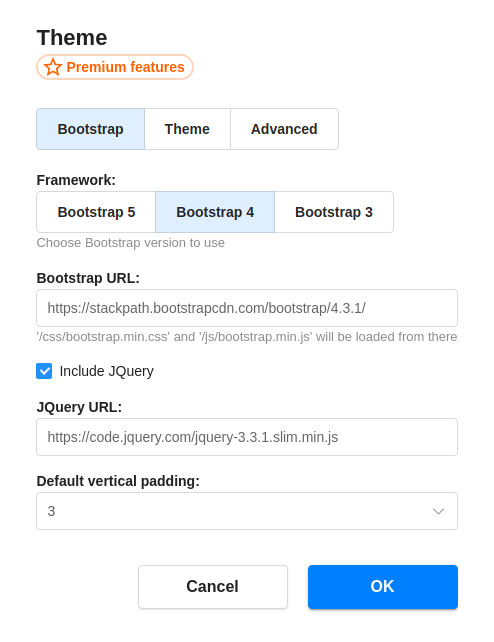
Changing it affects the content you create from then on, and how N1ED supports the framework's content on your visitors' pages. The content you already have is not converted.
With Tailwind CSS, the section also shows the Theme of your content: a theme from the DaisyUI collection, or the URL of your own DaisyUI theme.
Where the framework is loaded from
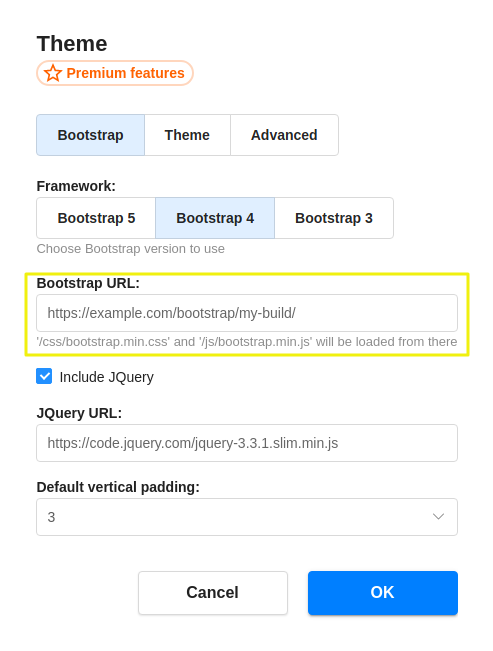
Load from CDN loads the framework from a public CDN, which fits a website that uses the stock framework. If your website has its own build, for example Bootstrap with your colors and fonts, click Change and enter its URL under Use Custom CSS, so the content in the editor looks exactly as on your website:
- for Bootstrap, the URL of the folder of the build, the one with the
cssandjsfolders in it (likehttps://example.com/assets/bootstrap/): N1ED loadscss/bootstrap.min.cssfrom it; - for Tailwind CSS, the URL of the CSS file.
Load on visitor pages adds the framework's CSS to the pages of your website that show the edited content, for websites whose theme does not load the framework itself. It works through widgets.js, the small script N1ED adds to the content it saves. Under Advanced…, Use fallback JS for Tabs & Accordions makes these widgets work on your pages without the framework's own JavaScript.
Extra CSS & JS adds your own files to the editor and to your pages, see CSS theming.
Show grid on start outlines the containers, rows and columns of your content as soon as the editor loads, see structure highlighting.
Advanced options
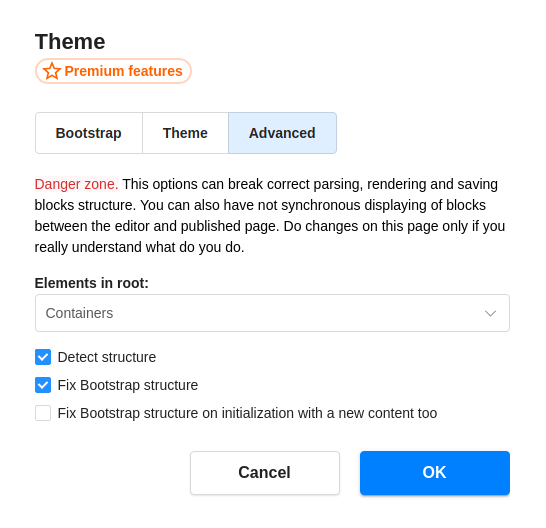
A few options change how N1ED finds and fixes the structure of the framework in your content. Please do not change them if you do not know what exactly you do. On older API keys they are under Advanced → Configure in the same section; on new ones they are not in the Dashboard, and you can set them in the editor's config (see Dynamic config).
Configuration parameters
The keys of a framework's settings start with its name: bootstrap5.url, tailwind4.url, bootstrap4.url, bootstrap3.url. Below they are shown for bootstrap5.
Framework
Specify the framework you use.
frameworkstringbootstrap4, new API keys: bootstrap5bootstrap5, tailwind4, bootstrap4, bootstrap3Use your own build
false loads the framework from the CDN, true from the URL below.
bootstrap5.useCustomFrameworkUrlbooleanfalseBootstrap URL
URL from where you load your Bootstrap in the theme of your website. You can use the default Bootstrap version from CDN, but specifying here exactly your Bootstrap URL will apply to content preview all your custom styles you could probably include in your own Bootstrap build.
bootstrap5.urlstringhttps://cdn.jsdelivr.net/npm/bootstrap@5.3.8/dist/Absolute (recommended) URL of the folder with the Bootstrap build, with css/bootstrap.min.css inside. The defaults are Bootstrap 5.3.8, 4.6.2 and 3.4.1 from jsDelivr, and inside the editor N1ED loads them from its own cloud. For tailwind4 it is the URL of a CSS file, empty by default.
Include Bootstrap on visitor pages
Add the framework's CSS to the pages that show the edited content.
include.frameworkCssOnVisitorPagebooleanfalse, new API keys: trueFallback JS for Tabs & Accordions
Make Tabs and Accordions work on visitor pages without the framework's JavaScript.
bootstrap5.useFallbackJsForWidgetsbooleantrueElements in root
The type of elements you have in your content root element. Please do not change this value if you do not know what exactly do you do. This parameter is for supporting some tricky configurations when you need to fill content for example with rows only. Contact support if you are not sure, please.
bootstrap5.rootContainsstringcontainerscontainers, rows, noneDetect structure
Automatically detect Bootstrap structure. Please do not change this value if you do not know what exactly do you do.
bootstrap5.detectStructurebooleantrueFix Bootstrap structure
Fix Bootstrap structure on editor load. This is very important not to disable this flag in order to support your existing, probably non-Bootstrap content. This is also a solution from not expected HTML modification your CMS may do on the server side when you save or load content.
bootstrap5.fixStructurebooleantrueFix Bootstrap structure on new content too
Keep all the content inside the grid: an empty content gets a block with one full-width column to write in.
bootstrap5.fixStructureAlwaysbooleanfalseProtect the grid
Keep the containers and rows of your content from being deleted or broken while you type: only the content of the columns is editable as text, the grid is changed with the block and grid tools.
bootstrap5.protectContentbooleantrueTailwind CSS theme
The DaisyUI theme of the content with Tailwind CSS 4, or the URL of your own theme: useCustomThemeUrl: true loads the theme from urlThemeCss instead of the one named in theme.
tailwind4.themestringlighttailwind4.useCustomThemeUrlbooleanfalsetailwind4.urlThemeCssstring